Vaultwarden behind Caddy: RAM, sync times and hardening
Tested on Vaultwarden 1.37.4
Test result
Vaultwarden 1.37.4 plus Caddy used 19.4 MiB idle and 52.0 MiB after 2,000 items were added, with a sampled peak of 117 MiB under load. A full sync of 2,000 items took a median of 102 ms on loopback (68 to 118 ms over 3 runs; an earlier run of the same script gave 70 ms). With SIGNUPS_ALLOWED=false (the compose default here) a new signup was refused with HTTP 400, with no ADMIN_TOKEN the admin page was disabled, and an argon2-hashed ADMIN_TOKEN worked through Compose when every $ was written as $$.
A personal Vaultwarden fits in very little memory, so the sizing question is about TLS and hardening, not RAM. This test ran Vaultwarden 1.37.4 behind Caddy with its internal certificate authority, filled one account with 2,000 synthetic logins through the API, and measured what a client sees.
HTTPS is part of the setup
The Vaultwarden wiki says that enabling HTTPS is “pretty much required nowadays” because the Bitwarden web vault uses web crypto APIs that most browsers expose only in HTTPS contexts. The same page says the mobile app needs properly configured OCSP stapling. This test did not try a mobile client or a browser over plain HTTP on a non-local name, so those two statements are the documentation’s, not measured here.
What was measured: Caddy issued a certificate for vault.lab.internal from its own local authority (“Caddy Local Authority - 2026 ECC Root”, valid to 2036) and served it over TLS 1.3 with HTTP/2. A plain HTTP request to the TLS port got HTTP 400 from Caddy. The web vault (version 2026.7.0, read from /web-vault/version.json in the container) loaded and unlocked in Chromium once the test browser was told to ignore the lab CA, and the API client trusted the exported root certificate. Clients on real devices would need that root installed, or a certificate from a public CA.
Show the full file
services:
  vaultwarden:
    image: vaultwarden/server:1.37.4
    container_name: vw
    restart: unless-stopped
    environment:
      DOMAIN: "https://vault.lab.internal:8080"
      SIGNUPS_ALLOWED: "${SIGNUPS_ALLOWED:-false}"
    volumes:
      - vw_data:/data
  caddy:
    image: caddy:2.10
    container_name: caddy
    restart: unless-stopped
    ports:
      - "127.0.0.1:8080:8080"
    volumes:
      - ./Caddyfile:/etc/caddy/Caddyfile:ro
      - caddy_data:/data
volumes:
  vw_data:
  caddy_data:
The Caddyfile has one site, https://vault.lab.internal:8080, with tls internal and reverse_proxy vaultwarden:80. The wiki’s proxy examples add compression and an X-Real-IP header for fail2ban; neither was used here.
Measured numbers
| Measurement | Result |
|---|---|
| Items in the vault | 2,000 logins (name, username, password, URI, notes), all verified by decrypting after the sync |
| Adding the 2,000 items through `POST /api/ciphers`, 8 parallel clients | 5.9 s |
| Password login, `POST /identity/connect/token` (server side), 3 runs | 124 ms (124 to 126 ms) |
| `GET /api/accounts/profile`, 3 runs | 5.6 ms (4.9 to 6.9 ms) |
| `GET /api/sync` with 2,000 items, 3 runs | 102 ms (68 to 118 ms) |
| Sync response size | 3.29 MB |
| Data directory, account only | 0.3 MB (db.sqlite3 0.3 MB) |
| Data directory, 2,000 items, live | 60.2 MB (db.sqlite3 3.1 MB, write-ahead log 57.0 MB) |
| Data directory after `docker stop` (WAL still present) | 60.2 MB (`docker stop` exit 0, took 0.3 s) |
| Data directory after `wal_checkpoint(TRUNCATE)` with the container stopped | 3.1 MB (db.sqlite3 3.1 MB) |
Median of 3 runs with the range in parentheses for the login, profile and sync rows; the item-adding time and the data-directory sizes are single measurements. Client and server in the same VM over loopback, so network time is about zero. Login time excludes the client's own 600,000-iteration PBKDF2, which runs once per process outside the timer. VM 4 vCPU, 4 GB.
| Moment | vaultwarden median | caddy median | Both, median | Both, peak sample | Samples |
|---|---|---|---|---|---|
| Idle, account only (0 items) | 7.3 | 12.1 | 19.4 | 19.8 | 19 |
| Idle after 2,000 items were added (30 s later) | 34.8 | 17.2 | 52.0 | 52.4 | 19 |
| During 3 login + profile + sync rounds (about 2 s between samples) | 82.4 | 17.2 | 99.6 | 117.0 | 4 |
| During 8 parallel clients looping the same requests (about 2 s between samples) | 72.3 | 17.2 | 89.5 | 117.0 | 15 |
VM 4 vCPU, 4 GB. Samples come from `docker stats --no-stream` and are about 2 s apart (not 1 s); peaks are maxima of those samples. Items are synthetic logins encrypted client-side. Vaultwarden's own SQLite backend, no external database.
- Idle RAM of the pair was 19.4 MiB with an account and no items, of which Caddy was 12.1 MiB. All RAM samples here come from
docker stats --no-streamand are about 2 s apart; peaks are maxima of those samples. The single-container idle figure in the stack table below (7.4 MiB) was taken on an idle stack with no account and excludes Caddy. - After the 2,000 items arrived, Vaultwarden itself settled at 34.8 MiB 30 s later. During a burst of 8 parallel clients repeating login, profile and sync, the highest sample for both containers together was 117.0 MiB. The 3-round row has only 4 samples because those requests finish in seconds, so read its peak as indicative.
- The write-ahead log is the surprise in the disk numbers. After the items were added,
db.sqlite3was 3.1 MB but the-walfile next to it was 57.0 MB.docker stop(exit status 0 after 0.3 s, so not a kill timeout) did not fold it back; only an explicitPRAGMA wal_checkpoint(TRUNCATE)with the container stopped brought the directory down to 3.1 MB. Whether the log shrinks by itself later was not tested. Back up the directory as a whole (or use SQLite’s own backup tooling), never justdb.sqlite3.
| Stack | Version | RAM at idle | CPU at idle | Images on disk | Ready after |
|---|---|---|---|---|---|
| Vaultwarden | 1.37.4 | 0.00% | 402 MB | 2 s |
The 2,000 items are synthetic logins created by client.py, which implements the Bitwarden registration and encryption flow in Python. Items were encrypted client-side, and after the sync every item decrypted back to the exact seeded text (2,000 of 2,000). Real vaults carry attachments, longer notes, icons and more devices, which this test did not model.
Signups and the admin token
| Step | Result |
|---|---|
| `SIGNUPS_ALLOWED=true`: `send-verification-email` then `register/finish` for the test account | register 200 |
| Container recreated with `SIGNUPS_ALLOWED=false`; new email asks for `/identity/accounts/register/send-verification-email` | HTTP 400: Registration not allowed or user already exists |
| The existing account logs in and syncs after the change | yes, login 118 ms, sync 98 ms |
Tested through the API only. Invitations, SSO and the web form were not tested.
Registration in this test went through POST /identity/accounts/register/send-verification-email and register/finish, the flow the 1.37.4 API accepted. After the container was recreated with SIGNUPS_ALLOWED=false, the first of those two calls for a new email address was refused with HTTP 400 and the message “Registration not allowed or user already exists”. The existing account kept working. Invitations, SSO and the web signup form were not tested.
With no ADMIN_TOKEN in the compose file (the shipped default), GET /admin returned HTTP 200 with the text “The admin panel is disabled, please configure the ‘ADMIN_TOKEN’ variable to enable it”, and posting an empty token or token=anything returned HTTP 404; the test did not probe the page further.
| Case | Result |
|---|---|
| No `ADMIN_TOKEN` in the compose file (the shipped default): `GET /admin`, `POST /admin` with an empty token, `POST /admin` with `token=anything` | HTTP 200 (body: "The admin panel is disabled, please configure the 'ADMIN_TOKEN' variable to enable it"), 404, 404 |
| Plain token, wrong token posted to /admin | HTTP 401 |
| Plain token, right token posted to /admin | HTTP 200 |
| Plain token, startup log | [NOTICE] You are using a plain text `ADMIN_TOKEN` which is insecure. |
| Hash from `vaultwarden hash` (default preset) | $argon2id$v=19$m=65540,t=3,p=4... |
| Hashed token set through Compose with `$` written as `$$`; wrong token | HTTP 401 |
| Hashed token; the password the hash was made from | HTTP 200 |
| Hashed token; the PHC string itself posted as the token | HTTP 401 |
| Value stored in the container environment | ADMIN_TOKEN=$argon2id$v=... |
Status codes from curl against Caddy over HTTPS. The admin page was fetched with the cookie from the successful login.
The wiki describes a built-in PHC generator (vaultwarden hash) and says to escape every $ in the generated string as $$ in Docker Compose. Both were followed. The command needed a terminal, so the test ran it under script. With a plain token the container logged a [NOTICE] that the token is insecure; with the hash the posted password was accepted (HTTP 200) and the PHC string itself was not (HTTP 401), which is the expected behavior for a hashed token. The check was done by posting to /admin, not by clicking through the admin page. The plain token in the test (lab-only-not-a-secret) is public, so never use it outside a throwaway lab; an admin page that is reachable from the internet should have a hashed token and ideally no public route at all.
Steps that were run
SIGNUPS_ALLOWED=true docker compose up -d             # Vaultwarden + Caddy (internal CA); signups on only to create the test account
docker cp caddy:/data/caddy/pki/authorities/local/root.crt .   # root to trust on clients
SIGNUPS_ALLOWED=false docker compose up -d            # recreate with signups disabled (the compose default)
# plain-token check: plain.yml (written by admin.sh) sets ADMIN_TOKEN to the lab placeholder, applied with -f compose.yml -f plain.yml
script -qec "docker exec -it vw /vaultwarden hash" /dev/null   # asks for the password twice
docker compose -f compose.yml -f hashed.yml up -d # hashed.yml sets ADMIN_TOKEN with $ written as $$Show the full file
#!/usr/bin/env bash
# vaultwarden: Vaultwarden 1.37.4 behind Caddy (internal CA). RAM, login/sync timings with 2,000 items, SQLite size,
# SIGNUPS_ALLOWED=false, and an argon2-hashed ADMIN_TOKEN. Items are synthetic and encrypted client-side by client.py.
set -uo pipefail
source "$(dirname "$0")/../_e/lib.sh"
T=vaultwarden; D="$ROOT/lab/tests/$T"; OUT="$ROOT/evidence/tests/$T"; RAW="$OUT/raw"; N=2000; REPS=3
rm -rf "$OUT"; mkdir -p "$RAW"
start_vm "${VMP:-e}-$T" || exit 1
collect_env "$OUT"
gx 'sudo apt-get install -y -qq python3-cryptography >/dev/null 2>&1; echo "127.0.0.1 vault.lab.internal" | sudo tee -a /etc/hosts >/dev/null; mkdir -p ~/w'
for f in compose.yml Caddyfile client.py; do vm scp-to "$D/$f" w/; done
vm scp-to "$ROOT/lab/tests/_e/sampler.py" w/
gx 'cd w && docker pull -q vaultwarden/server:1.37.4 >/dev/null && docker pull -q caddy:2.10 >/dev/null; docker images --format "{{.Repository}}:{{.Tag}} {{.ID}}" ' > "$RAW/images.txt"
# --- phase 1: signups on, plain token
T0=$(now_ms)
gx 'cd w && SIGNUPS_ALLOWED=true docker compose up -d 2>&1 | tail -2; for i in $(seq 1 120); do curl -fsk --resolve vault.lab.internal:8080:127.0.0.1 https://vault.lab.internal:8080/alive >/dev/null && echo "ready after ${i}s" && exit 0; sleep 1; done; exit 1' | tee "$RAW/01-up.txt"
echo "up_wall_ms=$(( $(now_ms) - T0 ))" >> "$RAW/01-up.txt"
gx 'docker cp caddy:/data/caddy/pki/authorities/local/root.crt ~/w/root.crt && openssl x509 -in ~/w/root.crt -noout -subject -issuer -dates' > "$RAW/02-caddy-root-ca.txt"
gx 'curl -sv --cacert ~/w/root.crt https://vault.lab.internal:8080/alive 2>&1 | grep -Ei "SSL connection|subject:|issuer:|HTTP/|expire date"' > "$RAW/03-tls-handshake.txt"
gx 'curl -s -o /dev/null -w "plain http to caddy port: %{http_code}\n" --max-time 5 http://127.0.0.1:8080/alive; true' > "$RAW/03b-http-on-tls-port.txt" 2>&1
gx 'curl -s --cacert ~/w/root.crt https://vault.lab.internal:8080/api/version; echo' > "$RAW/04-version.txt"
gx 'docker exec vw sh -c "cat /web-vault/version.json 2>&1; ls /web-vault | head -5"' > "$RAW/04b-web-vault-version.txt" 2>&1
CL='cd ~/w && SSL_CERT_FILE=$HOME/w/root.crt python3 client.py'
gx "$CL register" > "$RAW/05-register.txt" 2>&1
sleep 20
gx "sudo timeout 40 python3 w/sampler.py /tmp/mem.csv 2 || true; cat /tmp/mem.csv" > "$RAW/mem-idle-0-items.csv" 2>&1
gx 'sudo ls -l /var/lib/docker/volumes/w_vw_data/_data/ | grep sqlite; sudo du -sb /var/lib/docker/volumes/w_vw_data/_data' > "$RAW/db-size-0-items.txt"
S=$(now_ms)
gx "$CL seed $N" | tee "$RAW/06-seed.txt"
echo "seed_wall_ms=$(( $(now_ms) - S ))" >> "$RAW/06-seed.txt"
gx "$CL verify $N" > "$RAW/07-verify.txt" 2>&1
gx 'sudo sqlite3 -version >/dev/null 2>&1 || sudo apt-get install -y -qq sqlite3 >/dev/null 2>&1; sudo sqlite3 /var/lib/docker/volumes/w_vw_data/_data/db.sqlite3 "select count(*) from ciphers; select count(*) from users; pragma journal_mode;"; sudo ls -l /var/lib/docker/volumes/w_vw_data/_data/ | grep sqlite; sudo du -sb /var/lib/docker/volumes/w_vw_data/_data' > "$RAW/db-size-2000-items.txt"
sleep 30
gx "sudo timeout 40 python3 w/sampler.py /tmp/mem.csv 2 || true; cat /tmp/mem.csv" > "$RAW/mem-idle-2000-items.csv" 2>&1
# timed requests, 3 reps, with the sampler running
gx 'nohup sudo python3 w/sampler.py /tmp/memb.csv 1 >/dev/null 2>&1 & echo $! > /tmp/sampler.pid'
sleep 3
gx "$CL bench $REPS" > "$RAW/08-bench.json" 2>&1
sleep 3
gx 'sudo kill $(cat /tmp/sampler.pid); sleep 1; cat /tmp/memb.csv' > "$RAW/mem-during-bench.csv"
# RAM during a burst: 8 parallel sync loops
gx 'nohup sudo python3 w/sampler.py /tmp/memc.csv 1 >/dev/null 2>&1 & echo $! > /tmp/sampler.pid'
sleep 3
gx "$CL bench 1 >/dev/null; for i in 1 2 3 4 5 6 7 8; do ($CL bench 3 >/dev/null &) ; done; sleep 25" > /dev/null 2>&1
gx 'sudo kill $(cat /tmp/sampler.pid); sleep 1; cat /tmp/memc.csv' > "$RAW/mem-during-burst.csv"
# SQLite size after a clean stop (WAL folded into the main file), then start again
gx 'cd w && S=$(date +%s%3N); docker stop vw >/dev/null; RC=$?; echo "docker_stop_exit=$RC ms=$(( $(date +%s%3N) - S ))"; echo "## after clean stop" && sudo ls -l /var/lib/docker/volumes/w_vw_data/_data/ | grep sqlite; sudo du -sb /var/lib/docker/volumes/w_vw_data/_data; echo "## after PRAGMA wal_checkpoint(TRUNCATE) with vw stopped"; sudo sqlite3 /var/lib/docker/volumes/w_vw_data/_data/db.sqlite3 "pragma wal_checkpoint(truncate);"; sudo ls -l /var/lib/docker/volumes/w_vw_data/_data/ | grep sqlite; sudo du -sb /var/lib/docker/volumes/w_vw_data/_data; docker start vw >/dev/null' > "$RAW/db-size-2000-items-after-clean-stop.txt" 2>&1
# --- phase 2: signups off
gx 'cd w && SIGNUPS_ALLOWED=false docker compose up -d 2>&1 | tail -3; sleep 8; docker exec vw env | grep SIGNUPS' > "$RAW/09-signups-off-up.txt" 2>&1
gx "cd ~/w && SSL_CERT_FILE=\$HOME/w/root.crt VW_EMAIL=latecomer@lab.invalid python3 client.py trysignup" > "$RAW/10-signup-new-user-signups-off.txt" 2>&1
gx "$CL bench 1" > "$RAW/11-existing-user-still-logs-in.json" 2>&1
# --- phase 3: admin token, plain then argon2
vm scp-to "$D/admin.sh" w/
gx 'bash ~/w/admin.sh' > "$RAW/12-admin-token.txt" 2>&1
# --- screenshot: web vault with the 2,000 synthetic items
mkdir -p "$ROOT/public/shots/$T"
tunnel 18091 8080
( cd "$D" && node vault-shot.mjs "https://vault.lab.internal:18091/" "$ROOT/public/shots/$T" ) > "$RAW/15-shots.txt" 2>&1 || echo "shot failed" >> "$RAW/15-shots.txt"
untunnel
python3 "$D/summarize.py" "$RAW" "$OUT"
What went wrong
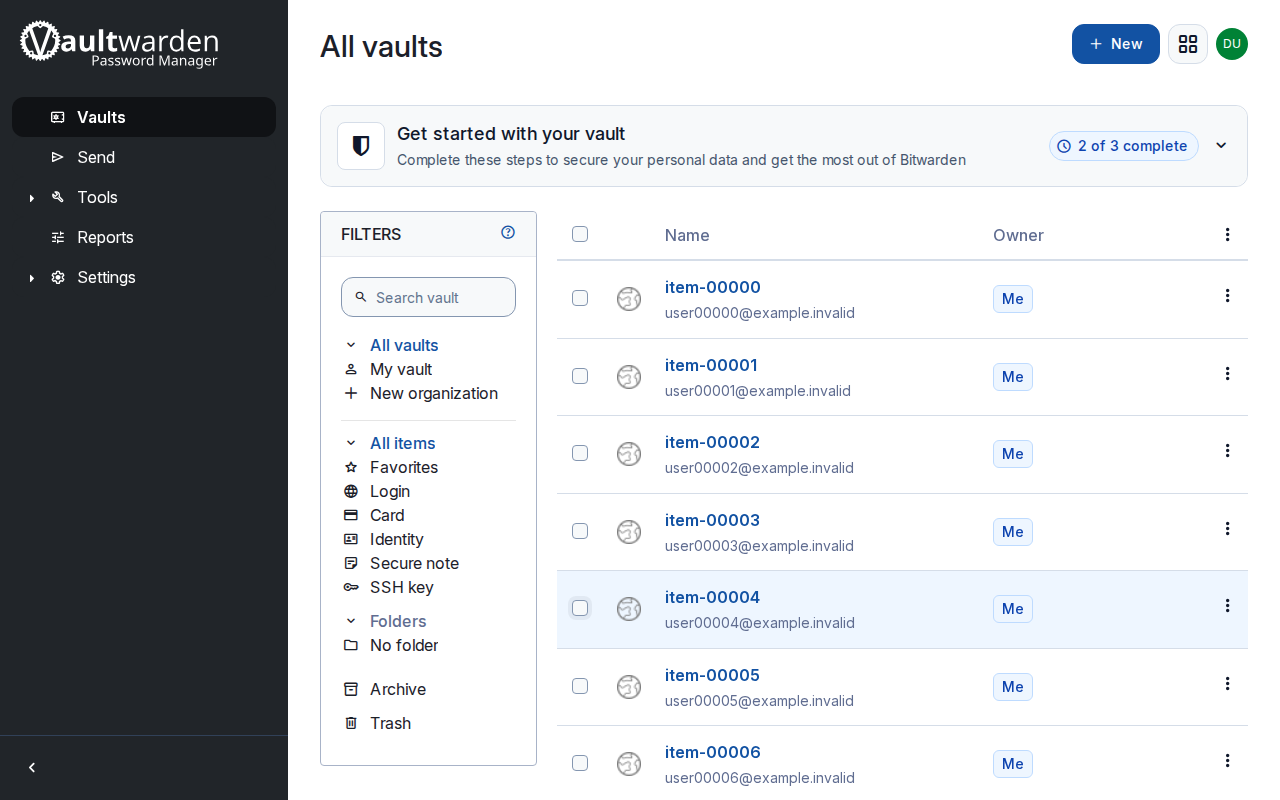
The first attempts to take the web vault screenshot failed because Vaultwarden’s web vault shows an extension-promotion page and a product tour after the first unlock; the screenshot script now dismisses both, and the picture is taken at the end of the measured run itself, after the admin-token checks, with signups off, a hashed admin token and the same 2,000 synthetic items. Neither affects the measurements.
What this test did not cover
Sources and how this was made
- Vaultwarden wiki: Enabling HTTPS
- Vaultwarden wiki: Enabling admin page
- Vaultwarden wiki: Proxy examples
How this page was made: the commands above were run by an AI agent on the test box on November 1, 2026, and the same agent drafted this text from the saved output. The site's owner reviewed the site before publication. Test method and editorial policy explain how results are checked, and what is not. Spotted an error? Tell us.