U5 / Hypervisors and platforms
Install Proxmox VE 9 on Debian 13: timed steps and RAM
Tested on Proxmox VE (pve-manager) 9.2.24
Test result
Following the official wiki page, Proxmox VE 9.2.24 installed on Debian 13 in 5 min 48 s of script time in a 4 vCPU, 6 GB VM, 3 min 30 s of it for the proxmox-ve package install. It idled at 1,496 MiB of RAM and used 5.4 GB of disk. After the wiki's last step, apt update failed with HTTP 401 from the enterprise repository, which the wiki says the install sets up automatically.
Installing Proxmox VE on top of an existing Debian is a short package job, and the Proxmox wiki documents it. This test ran the wiki’s steps one by one in a throwaway VM, with a clock on every step, to see how long the install takes and what the result costs at idle.
Test setup
Debian’s official debian-13-genericcloud-amd64.qcow2 was downloaded and checked against the published SHA-512 (it matched). It ran under QEMU/KVM directly on the test host with 4 vCPU, 6 GB RAM and a 40 GB virtual disk, booting with a cloud-init seed for an SSH user and the root password used by the web UI. Because the VM is one level under the host, the Proxmox guests in the LXC-versus-VM guide are nested by one more level. The VM used QEMU’s user-mode networking with a DHCP address, not the static IP the wiki asks for, and /etc/hosts got a line for pve1.lab.internal with that address, as the wiki requires of the hostname. A real install should follow the wiki on addressing.
The steps and their times
The wiki page gives these steps, which the script ran with the deviations listed after them: create the repository file, download the archive key and check it, apt update && apt full-upgrade, install proxmox-default-kernel and reboot, install proxmox-ve postfix open-iscsi chrony, remove the Debian kernel and os-prober, reboot, open the web interface on port 8006, and finally remove the installation repository file.
Deviations from the wiki: the script ran apt-get -y with DEBIAN_FRONTEND=noninteractive instead of interactive apt, used curl instead of wget for the key, pre-answered two debconf questions (postfix “Local only”, and the grub-pc target described below), used a DHCP address instead of a static one, and skipped the wiki’s step of creating the vmbr0 bridge on the host network (the guests in the LXC-versus-VM guide use a NAT bridge added separately).
| Step | Time | Result |
|---|---|---|
| Download Debian 13 cloud image, verify SHA-512 | 0.6 s | ok |
| Boot Debian 13 to SSH | 11.5 s | ok |
| Hostname entry in /etc/hosts | 0.2 s | ok |
| Add Proxmox no-subscription repository and key (SHA-256 checked) | 0.3 s | ok |
| `apt update && apt full-upgrade` | 54.3 s | ok |
| `apt install proxmox-default-kernel` | 30.4 s | ok |
| Reboot into the Proxmox kernel (until SSH answers) | 12.2 s | ok |
| `apt install proxmox-ve postfix open-iscsi chrony` | 3 min 30 s | ok |
| Remove Debian kernel and os-prober, `update-grub` | 3.1 s | ok |
| Reboot (until SSH answers) | 21.7 s | ok |
| Wait for the web UI on port 8006 to answer HTTP 200 | 0.3 s | ok |
| Remove the installation repository file | 0.2 s | ok |
| Total, from image download to the UI answering (includes the repo-removal step) | 5 min 48 s | |
| Key SHA-256 matches the value printed on the wiki page | yes |
Follows the Proxmox wiki page 'Install Proxmox VE on Debian 13 Trixie'. VM: 4 vCPU, 6 GB, Debian's official genericcloud image under QEMU/KVM on the host, 40 GB virtual disk. Single run. The script differs from the wiki: debconf pre-answers for grub-pc (/dev/vda) and postfix, `DEBIAN_FRONTEND=noninteractive`, apt-get -y, curl instead of wget, and no vmbr0 bridge step. Times include the VM's mirror and network speed.
- The repository is the one the wiki names,
pve-no-subscriptionfor suitetrixie, in apve-install-repo.sourcesfile. That is the repository for installs without a paid subscription. The wiki’s key checksum (136673be...) matched the downloaded file. - Nearly all of the time is the
proxmox-veinstall (3 min 30 s) and the upgrade (54.3 s); both depend on the mirror speed from this network. The two reboots took 12.2 s and 21.7 s on a VM with no firmware delays. - Postfix asked its configuration question; the script pre-answered “Local only”, the wiki’s choice for when you are unsure.
What the result costs
| Measurement | Value |
|---|---|
| Proxmox VE version | 9.2.24 |
| Kernel | 7.0.14-26-pve |
| RAM used, Debian 13 before (free -m, MiB) | 300 of 5931 |
| RAM used, Proxmox VE 5 minutes after the last reboot (free -m, MiB) | 1496 of 5923; available 4427 |
| RAM used, 6 samples 10 s apart, median / range (MiB) | 1497 (1496 to 1555) |
| Disk used on / before (MB) | 596 of 40111 |
| Disk used on / after (MB, df) | 5387 of 40111 |
| Host-side size of the VM's qcow2 overlay | 5.55 GiB |
| Web UI answer | 200 |
| `apt update` after removing the install repository (as the wiki's last step says) | E: Failed to fetch https://enterprise.proxmox.com/debian/pve/dists/trixie/InRelease 401 Unauthorized [IP: 51.91.38.34 443] |
| Repository files left in /etc/apt/sources.list.d | debian.sources, pve-enterprise.sources |
| Services active (pveproxy, pvedaemon, pve-cluster, pvestatd) | active active active active |
VM 4 vCPU, 6 GB. Measured by SSH in the guest, no Proxmox guests running.
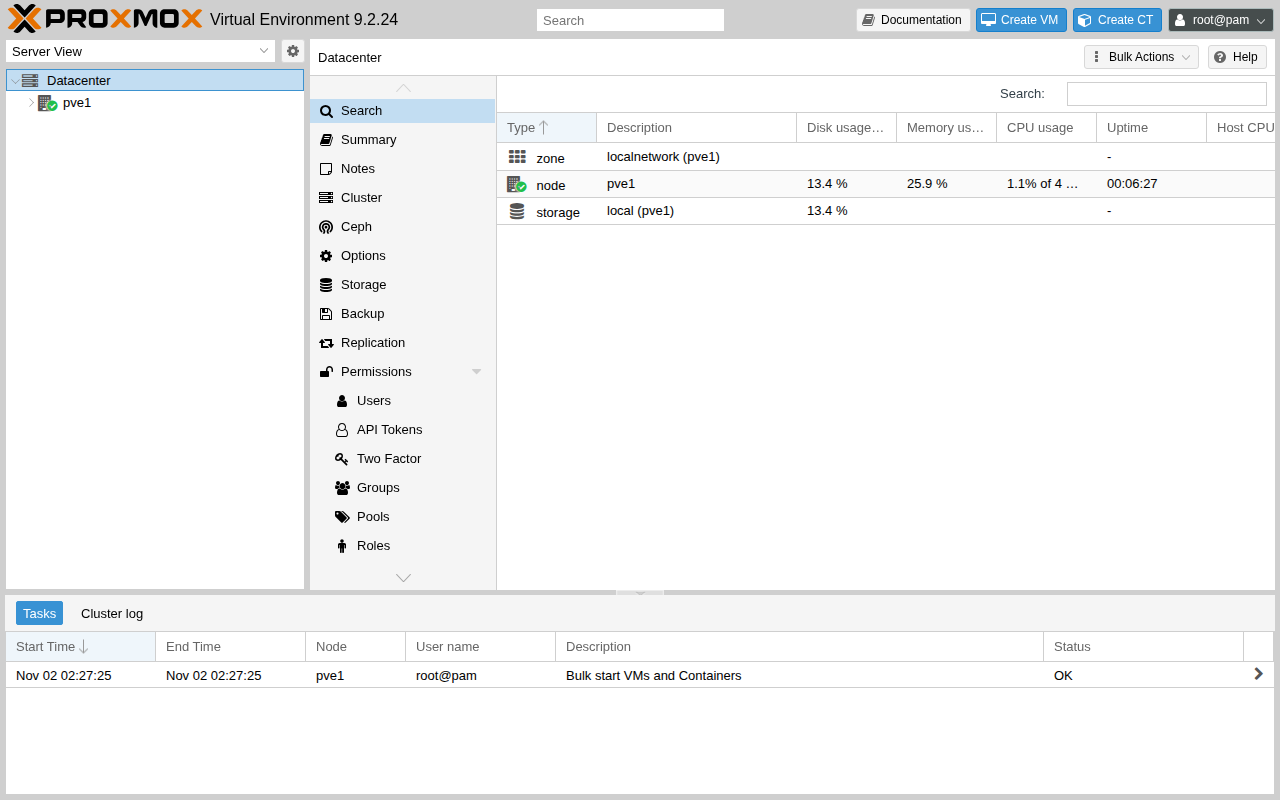
- RAM: 1,496 MiB used of 5,923 MiB five minutes after the last reboot, with nothing running on it (Debian before the install: 300 MiB). Six samples 10 s apart gave a median of 1,497 MiB.
- Disk: 5,387 MB used on
/against 596 MB before, and the VM’s overlay file was 5.55 GiB on the host. - The web UI answered HTTP 200 on port 8006 0.3 s after the final reboot finished, and
pveproxy,pvedaemon,pve-clusterandpvestatdwere active. The screenshot is the node view after signing in asroot@pamwith the lab password.
What went wrong
Two things, and the second is a finding.
First, the initial run failed (its logs are kept in raw/first-attempt-grub-pc-failure/). apt install proxmox-default-kernel and the later proxmox-ve install both ended with exit 100 because grub-pc could not configure itself without a target device in a non-interactive run (the cloud image boots with BIOS GRUB on /dev/vda). The Proxmox kernel was installed and booted regardless, but dpkg stayed in an error state and the Debian kernel removal failed. A debconf answer for grub-pc/install_devices before the install fixed it, and the reported run includes that line (/dev/vda, the only disk of this VM). On a real machine set it to your own boot disk: a wrong GRUB target can leave the machine unbootable. A system installed from Debian’s own installer would not need it; a cloud image might.
Second, after the wiki’s last step (removing pve-install-repo.sources), apt update failed:
E: Failed to fetch https://enterprise.proxmox.com/debian/pve/dists/trixie/InRelease 401 Unauthorized
pve-enterprise.sources was present and enabled in /etc/apt/sources.list.d/ after the install, and that repository needs a subscription. The wiki says the enterprise repository “is set up automatically during the installation”; the test did not check which package creates the file. The wiki’s last step is written for people who upload a subscription key. Without one, the install repository is the one to keep (or the enterprise file to disable), which the test did not go on to try; the evidence only shows the failing apt update.
Show the full file
#!/usr/bin/env bash
# proxmox: Proxmox VE 9 on Debian 13 (trixie) following the official wiki page "Install Proxmox VE on Debian 13 Trixie", inside a VM.
# Debian's official genericcloud image (SHA-512 verified) is booted directly under QEMU/KVM on the host, so the Proxmox guests of the next
# test (proxmox-guests) are one nested level deep. KEEP_DISK=1 keeps the installed disk for that test (which deletes it).
set -uo pipefail
export LAB_MEM=6144
source "$(dirname "$0")/../_e/lib.sh"; source "$(dirname "$0")/../_e/debvm.sh"
T=proxmox; D="$ROOT/lab/tests/$T"; OUT="$ROOT/evidence/tests/$T"; RAW="$OUT/raw"
DISK="$LABDIR/e-pve-installed.qcow2"
rm -rf "$OUT"; mkdir -p "$RAW" "$ROOT/public/shots/$T"; : > "$RAW/steps.tsv"
cleanup() { deb_stop; rm -f "$LABDIR/e-pve-user-data"; if [ "${KEEP_DISK:-0}" != 1 ] || [ "${FAILED:-0}" = 1 ]; then rm -f "$DISK" "$LABDIR/e-pve-seed.img" "$DEB_BASE"; fi; }
trap cleanup EXIT
reboot_wait() { # reboot, wait until SSH stops answering, then until it answers again; prints elapsed ms
  local S; S=$(now_ms); gx 'sudo systemctl reboot' >/dev/null 2>&1
  for _ in $(seq 1 90); do gx true 2>/dev/null || break; sleep 1; done
  for _ in $(seq 1 180); do gx true 2>/dev/null && break; sleep 1; done
  echo $(( $(now_ms) - S ))
}
step() { local n=$1; shift; local s e rc; s=$(now_ms); "$@" > "$RAW/$n.log" 2>&1; rc=$?; e=$(now_ms); printf '%s\t%d\t%d\n' "$n" $((e-s)) $rc >> "$RAW/steps.tsv"; echo "$n rc=$rc $((e-s)) ms"; return $rc; }
s0=$(now_ms)
step 00-fetch-verify-image deb_fetch "$RAW" || { FAILED=1; exit 1; }
rm -f "$DISK"; qemu-img create -q -f qcow2 -F qcow2 -b "$DEB_BASE" "$DISK" 40G
deb_seed pve pve1
HOST_LOAD="$(cut -d' ' -f1-3 /proc/loadavg)"
S=$(now_ms); deb_boot "$DISK" "$LABDIR/e-pve-seed.img" || { FAILED=1; exit 1; }; printf '01-boot-debian-to-ssh\t%d\t0\n' $(( $(now_ms) - S )) >> "$RAW/steps.tsv"
gx 'cloud-init status --wait >/dev/null 2>&1; true'
collect_env "$OUT"; gx '. /etc/os-release; echo "$PRETTY_NAME"; uname -r; free -m | sed -n 2p; df -m / | tail -1; nproc' > "$RAW/debian-before.txt"
step 02-hosts-entry gx 'sudo sed -i "/^127.0.1.1/d" /etc/hosts; echo "10.0.2.15 pve1.lab.internal pve1" | sudo tee -a /etc/hosts; hostname --ip-address'
gx 'echo "grub-pc grub-pc/install_devices multiselect /dev/vda" | sudo debconf-set-selections; echo "grub-pc grub-pc/install_devices_empty boolean false" | sudo debconf-set-selections'  # lab fix: the cloud image boots with BIOS GRUB on /dev/vda; without this grub-pc fails to configure non-interactively
step 03-repo-and-key gx 'sudo bash -c "cat > /etc/apt/sources.list.d/pve-install-repo.sources <<EOL
Types: deb
URIs: http://download.proxmox.com/debian/pve
Suites: trixie
Components: pve-no-subscription
Signed-By: /usr/share/keyrings/proxmox-archive-keyring.gpg
EOL
curl -fsSL https://enterprise.proxmox.com/debian/proxmox-archive-keyring-trixie.gpg -o /usr/share/keyrings/proxmox-archive-keyring.gpg
sha256sum /usr/share/keyrings/proxmox-archive-keyring.gpg
echo wiki-sha256 136673be77aba35dcce385b28737689ad64fd785a797e57897589aed08db6e45"; cat /etc/apt/sources.list.d/pve-install-repo.sources'
step 04-apt-update-full-upgrade gx 'sudo DEBIAN_FRONTEND=noninteractive bash -c "apt-get update && apt-get -y full-upgrade"'
step 05-install-proxmox-default-kernel gx 'sudo DEBIAN_FRONTEND=noninteractive apt-get -y install proxmox-default-kernel'
printf '06-reboot-into-pve-kernel	%d	0
' $(reboot_wait) >> "$RAW/steps.tsv"; gx 'uname -r' > "$RAW/06-kernel.txt"
gx 'echo "postfix postfix/main_mailer_type select Local only" | sudo debconf-set-selections; echo "postfix postfix/mailname string pve1.lab.internal" | sudo debconf-set-selections'
step 07-install-proxmox-ve gx 'sudo DEBIAN_FRONTEND=noninteractive apt-get -y install proxmox-ve postfix open-iscsi chrony'
step 08-remove-debian-kernel-os-prober gx "sudo DEBIAN_FRONTEND=noninteractive bash -c \"apt-get -y remove linux-image-amd64 'linux-image-6.12*' && update-grub && apt-get -y remove os-prober\""
printf '09-reboot-final	%d	0
' $(reboot_wait) >> "$RAW/steps.tsv"
S=$(now_ms); for _ in $(seq 1 120); do [ "$(gx 'curl -sk -o /dev/null -w %{http_code} https://127.0.0.1:8006/' 2>/dev/null)" = 200 ] && break; sleep 2; done; printf '10-web-ui-answers-200\t%d\t0\n' $(( $(now_ms) - S )) >> "$RAW/steps.tsv"
step 11-remove-install-repo gx 'ls /etc/apt/sources.list.d/; echo ---; sudo rm /etc/apt/sources.list.d/pve-install-repo.sources; ls /etc/apt/sources.list.d/'
printf 'total_install_ms\t%d\n' $(( $(now_ms) - s0 )) > "$RAW/total.txt"
sleep 300
gx 'pveversion -v | head -12; echo ---; free -m; echo ---; grep -E "MemTotal|MemAvailable" /proc/meminfo; echo ---; df -m / | tail -1; sudo du -smx / 2>/dev/null; echo ---; ps -eo rss,comm --sort=-rss | head -12; echo ---; systemctl is-active pveproxy pvedaemon pve-cluster pvestatd; uname -r; curl -sk -o /dev/null -w "ui_http=%{http_code}\n" https://127.0.0.1:8006/' > "$RAW/after-idle-5min.txt" 2>&1
gx 'for i in 1 2 3 4 5 6; do free -m | awk "/Mem:/{print \$3, \$7}"; sleep 10; done' > "$RAW/mem-samples.txt"
gx 'sudo apt-get update 2>&1 | tail -4; ls /etc/apt/sources.list.d/; cat /etc/apt/sources.list.d/pve-enterprise.sources 2>&1 | head -8; apt-cache policy proxmox-ve | head -4' > "$RAW/repo-state-after-removal.txt" 2>&1
( cd "$D" && node shot.mjs https://127.0.0.1:$LAB_HTTP_PORT/ "$ROOT/public/shots/$T/ui.png" ) > "$RAW/shot.txt" 2>&1
ls -ls "$DISK" > "$RAW/overlay-size.txt"
python3 "$D/summarize.py" "$RAW" "$OUT"
What this test did not cover
Sources and how this was made
How this page was made: the commands above were run by an AI agent on the test box on November 2, 2026, and the same agent drafted this text from the saved output. The site's owner reviewed the site before publication. Test method and editorial policy explain how results are checked, and what is not. Spotted an error? Tell us.