U5 / Hypervisors and platforms
Proxmox LXC vs KVM guest: create, boot and RAM for nginx
Tested on Proxmox VE (pve-manager) 9.2.24
Test result
For the same nginx page on a nested Proxmox VE 9.2.24, the LXC container created in 2.5 s and answered HTTP 200 3.2 s after start, with 100 MiB charged to its cgroup (page cache included; the host's free -m used column moved by -8 MiB). The KVM guest created in 2.2 s but needed 12.0 s to answer and QEMU held 291 MiB (host free -m +263 MiB). Because the Proxmox host was itself a VM, use these as a comparison between the two, not as absolute numbers.

An LXC container and a KVM guest can both serve a web page; the difference is what each costs to create, how fast it comes up and how much memory the host spends on it. This test ran the same service, nginx’s default page, both ways on the Proxmox VE installed in the previous guide, which is a VM, so every number below comes from nested virtualization.
What is being compared
The Proxmox wiki says containers “use the kernel of the host system that they run on, instead of emulating a full operating system”, and that unprivileged is the default when creating one. A KVM guest runs its own kernel. Both guests here had 1 core and 512 MB, sat on a NAT bridge (vmbr0, 10.10.10.0/24, masquerade through the Proxmox host) with static addresses, and used the local directory storage, on which the setup script had enabled the extra content types iso, vztmpl, backup, snippets, images and rootdir.
- LXC: unprivileged, from the Proxmox
debian-13-standard_13.6-1_amd64template, nginx installed withaptinside the running container. - KVM: Debian’s official
debian-13-genericcloud-amd64.qcow2(SHA-512 checked against the published file), imported as the disk, CPU typehost, no guest agent, nginx installed on first boot by a cloud-init snippet.
Creation was timed 3 times for each (create, then destroy). In the third boot round the LXC container was left running while the KVM guest booted, so that KVM boot and its host memory delta were measured with the container up. Boot was timed 3 times for each: from the start command until curl from the Proxmox host got HTTP 200 from nginx, after the guest had been provisioned once. Nested means the Proxmox VM, with 4 vCPU and 6 GB, runs under QEMU/KVM on a shared host, and the KVM guest is one level deeper.
Results
| Measurement | LXC container (Debian 13 template) | KVM guest (Debian 13 cloud image) |
|---|---|---|
| Create (API call until the guest exists, stopped), 3 runs, s | 2.5 (2.5 to 2.7) | 2.2 (2.1 to 2.3) |
| Destroy with purge, 3 runs, s | 0.6 (0.6 to 0.7) | 0.7 (0.7 to 0.7) |
| Failed creations | 0 | 0 |
| Start command until nginx answers HTTP 200 from the Proxmox host, 3 runs, s | 3.2 (3.2 to 3.2) | 12.0 (11.9 to 12.8) |
| of which the `pct start` / `qm start` command itself, s | 2.0 (2.0 to 2.0) | 1.5 (1.4 to 1.5) |
| Boots where nginx never answered | 0 | 0 |
| Host-side memory of the guest 60 s after it answered (LXC: cgroup memory.current; KVM: QEMU RSS), MiB | 100 (97 to 100) | 291 (289 to 291) |
| Change in the Proxmox host's `free -m` used, MiB | -8 (-20 to -5) | 263 (260 to 272) |
| Memory the guest reports as used (`free` inside), MiB | 18 | not read (no guest agent) |
Both guests: 1 core, 512 MB, NAT bridge, storage `local` (directory; the script enabled the content types iso, vztmpl, backup, snippets, images and rootdir on it). The LXC container memory.current figure includes page cache and is not the same measure as QEMU RSS; the change in the host `free -m` used column is the cross-check. In rep 3 the LXC container was still running while the KVM guest booted. Nested virtualization: the Proxmox host is itself a VM (4 vCPU, 6 GB) on a shared host, so use these as comparisons between the two, not as absolute figures.
| Item | Value |
|---|---|
| LXC container root filesystem, space used on the Proxmox host (du, MB) | 811 |
| LXC container: `df` inside, total / used (MB) | 3952 / 701 |
| KVM guest disk, space used on the Proxmox host (du, MB) | 1241 |
| KVM guest disk, virtual size | 3 GiB (3221225472 bytes) |
| LXC template download (once), s | 3.9 |
| KVM guest image download (once), s | 4.9 |
| Installing nginx inside the running LXC container (apt), s | 7.0 |
| First KVM boot with cloud-init installing nginx, until HTTP 200, s | 54.1 |
| Template | debian-13-standard_13.6-1_amd64.tar.zst |
Disk figures from the Proxmox host after the third boot, with both guests running.
- Creating was about the same effort for both (2.5 s for the container, 2.2 s for the VM). The VM’s creation copies a 3 GiB disk image in, and destroying either took under a second.
- Boot is where they differ. The container answered after 3.2 s in all 3 runs; the KVM guest took 11.9 to 12.8 s. Nesting may slow the KVM guest’s boot, so the gap on real hardware could differ; the test did not separate the boot stages.
- Memory seen by the host: 100 MiB of cgroup memory for the container (97 to 100 MiB), against 291 MiB of QEMU resident memory for the VM (289 to 291 MiB). The container’s cgroup figure includes page cache;
freeinside it reported 18 MiB used. The host’s ownfree -mused column moved by -8 MiB for the container (noise: it ranged from -20 to -5) and by +263 MiB for the VM. - Disk: the container’s root filesystem used 811 MB on the host (a 4 GB raw file holding 701 MB of data inside), the VM’s 3 GiB disk used 1,241 MB.
- One-time costs: downloading the container template took 3.9 s and the VM image 4.9 s; installing nginx took 7.0 s inside the container, while the first KVM boot, including cloud-init installing nginx, took 54.1 s.
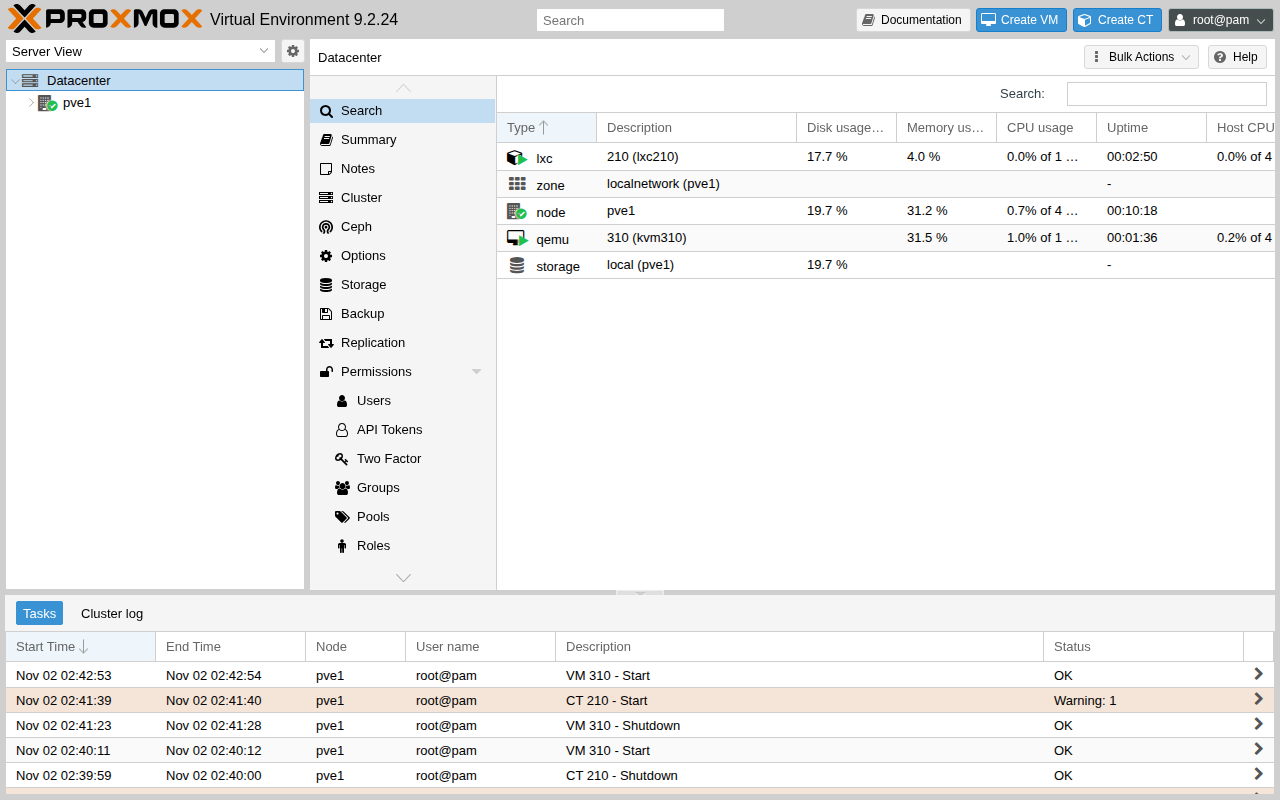
Starting the container produced a task warning from Proxmox (“Systemd 257 detected. You may need to enable nesting.”) which did not stop it; nginx answered. The container features were left at their defaults, and what nesting would change was not tested.
Steps
The setup script ran as root on the Proxmox VM:
pct create 210 local:vztmpl/debian-13-standard_13.6-1_amd64.tar.zst --memory 512 --cores 1 --swap 0 \
  --rootfs local:4 --net0 name=eth0,bridge=vmbr0,ip=10.10.10.20/24,gw=10.10.10.1 --unprivileged 1
qm create 310 --memory 512 --cores 1 --cpu host --net0 virtio,bridge=vmbr0 --scsihw virtio-scsi-pci \
  --scsi0 local:0,import-from=/root/debian.qcow2 --ide2 local:cloudinit --boot order=scsi0 \
--ipconfig0 ip=10.10.10.30/24,gw=10.10.10.1 --cicustom "user=local:snippets/nginx.yaml"Show the full file
#!/usr/bin/env bash
# Runs as root inside the Proxmox VE VM. pve-side.sh <outdir>
# Same service (nginx, default page) as an LXC container and as a KVM guest, both 1 core / 512 MB, on a NAT bridge (vmbr0, 10.10.10.0/24).
# A: create + destroy x3 (timed). B: provision one guest of each with nginx. C: start -> first HTTP 200, x3, with RAM and disk.
set -uo pipefail
OUT=$1; mkdir -p "$OUT"; cd "$OUT"
ms() { date +%s%3N; }
NIC=$(ip -o route get 1.1.1.1 | sed -n 's/.* dev \([^ ]*\).*/\1/p')
LXC_IP=10.10.10.20; VM_IP=10.10.10.30
echo "nic=$NIC" > setup.txt
# --- network: NAT bridge (iptables masquerade) so the guests reach the internet through the Proxmox host
apt-get install -y -qq iptables >/dev/null 2>&1
cat > /etc/network/interfaces.d/vmbr0 <<EOT
auto vmbr0
iface vmbr0 inet static
	address 10.10.10.1/24
	bridge-ports none
	bridge-stp off
	bridge-fd 0
	post-up   echo 1 > /proc/sys/net/ipv4/ip_forward
	post-up   iptables -t nat -A POSTROUTING -s 10.10.10.0/24 -o $NIC -j MASQUERADE
EOT
grep -q "interfaces.d" /etc/network/interfaces || echo "source /etc/network/interfaces.d/*" >> /etc/network/interfaces
ifreload -a >> setup.txt 2>&1; ip -br addr show vmbr0 >> setup.txt; pveversion >> setup.txt
# --- LXC template
S=$(ms); pveam update >> setup.txt 2>&1; TPL=$(pveam available --section system | awk '/debian-13-standard.*amd64/{print $2}' | sort | tail -1); echo "template=$TPL" >> setup.txt
pveam download local "$TPL" >> setup.txt 2>&1; echo "template_download_ms=$(( $(ms) - S ))" >> setup.txt
# --- KVM guest image: Debian 13 genericcloud, checked against the published SHA512SUMS
S=$(ms); curl -fsSL https://cloud.debian.org/images/cloud/trixie/latest/SHA512SUMS -o SHA512SUMS; curl -fsSL -o /root/debian.qcow2 https://cloud.debian.org/images/cloud/trixie/latest/debian-13-genericcloud-amd64.qcow2
want=$(grep ' debian-13-genericcloud-amd64.qcow2$' SHA512SUMS | cut -d' ' -f1); got=$(sha512sum /root/debian.qcow2 | cut -d' ' -f1); [ "$want" = "$got" ] && echo "guest_image_checksum=OK" >> setup.txt || echo "guest_image_checksum=MISMATCH" >> setup.txt
echo "guest_image_download_ms=$(( $(ms) - S ))" >> setup.txt
pvesm set local --content iso,vztmpl,backup,snippets,images,rootdir >> setup.txt 2>&1
cat > /var/lib/vz/snippets/nginx.yaml <<'EOT'
#cloud-config
packages: [nginx]
runcmd: [systemctl enable --now nginx]
EOT
KEY=$(cat /home/lab/.ssh/authorized_keys | head -1)
lxc_create() { pct create "$1" "local:vztmpl/$(basename "$TPL")" --hostname "lxc$1" --memory 512 --cores 1 --swap 0 --rootfs local:4 --net0 name=eth0,bridge=vmbr0,ip="$2"/24,gw=10.10.10.1 --nameserver 1.1.1.1 --unprivileged 1 --ssh-public-keys <(echo "$KEY") ; }
vm_create() { qm create "$1" --name "kvm$1" --memory 512 --cores 1 --cpu host --net0 virtio,bridge=vmbr0 --scsihw virtio-scsi-pci --serial0 socket --vga serial0 --agent 0 \
  --scsi0 "local:0,import-from=/root/debian.qcow2" --ide2 local:cloudinit --boot order=scsi0 --ciuser lab --sshkeys <(echo "$KEY") --ipconfig0 ip="$2"/24,gw=10.10.10.1 --nameserver 1.1.1.1 "${@:3}"; }
# --- A: creation time x3
: > create.tsv
for i in 1 2 3; do
  S=$(ms); lxc_create $((200 + i)) 10.10.10.$((40 + i)) > create-lxc-$i.log 2>&1; rc=$?; E=$(ms); S2=$(ms); pct destroy $((200 + i)) --purge >> create-lxc-$i.log 2>&1; printf 'lxc\t%d\t%d\t%d\t%d\n' $i $((E - S)) $rc $(( $(ms) - S2 )) >> create.tsv
  S=$(ms); vm_create $((300 + i)) 10.10.10.$((50 + i)) > create-vm-$i.log 2>&1; rc=$?; E=$(ms); S2=$(ms); qm destroy $((300 + i)) --purge >> create-vm-$i.log 2>&1; printf 'kvm\t%d\t%d\t%d\t%d\n' $i $((E - S)) $rc $(( $(ms) - S2 )) >> create.tsv
done
# --- B: provision with nginx (not timed as boot)
lxc_create 210 $LXC_IP > provision-lxc.log 2>&1; pct start 210 >> provision-lxc.log 2>&1; pct status 210 >> setup.txt
for i in $(seq 1 60); do pct exec 210 -- true 2>/dev/null && break; sleep 1; done
S=$(ms); pct exec 210 -- bash -c 'apt-get update -qq && DEBIAN_FRONTEND=noninteractive apt-get install -y -qq nginx' >> provision-lxc.log 2>&1; echo "lxc_nginx_install_ms=$(( $(ms) - S ))" >> setup.txt
pct shutdown 210 >> provision-lxc.log 2>&1
S=$(ms); vm_create 310 $VM_IP --cicustom "user=local:snippets/nginx.yaml" > provision-vm.log 2>&1; qm start 310 >> provision-vm.log 2>&1
for i in $(seq 1 240); do [ "$(curl -s -o /dev/null -m 2 -w %{http_code} http://$VM_IP/)" = 200 ] && break; sleep 2; done; echo "kvm_first_boot_with_cloudinit_nginx_ms=$(( $(ms) - S ))" >> setup.txt
qm shutdown 310 >> provision-vm.log 2>&1; for i in $(seq 1 60); do [ "$(qm status 310)" = "status: stopped" ] && break; sleep 2; done
# --- C: boot x3
: > boot.tsv; : > resources.tsv
free_used() { free -m | awk '/Mem:/{print $3}'; }
for i in 1 2 3; do
  for kind in lxc kvm; do
    [ $kind = lxc ] && { ID=210; IP=$LXC_IP; } || { ID=310; IP=$VM_IP; }
    sleep 10; U0=$(free_used); S=$(ms)
    if [ $kind = lxc ]; then pct start $ID >> boot-$kind.log 2>&1; else qm start $ID >> boot-$kind.log 2>&1; fi
    SB=$(ms); T_CMD=$((SB - S)); OK=0
    for j in $(seq 1 600); do [ "$(curl -s -o /dev/null -m 1 -w %{http_code} http://$IP/)" = 200 ] && { OK=1; break; }; sleep 0.2; done
    E=$(ms); printf '%s\t%d\t%d\t%d\t%d\n' $kind $i $((E - S)) $T_CMD $OK >> boot.tsv
    sleep 60
    U1=$(free_used)
    if [ $kind = lxc ]; then HOSTRAM=$(( $(cat /sys/fs/cgroup/lxc/$ID/memory.current) / 1048576 )); GUEST=$(pct exec $ID -- free -m | awk '/Mem:/{print $3}'); else HOSTRAM=$(( $(ps -o rss= -p $(cat /var/run/qemu-server/$ID.pid)) / 1024 )); GUEST=""; fi
    printf '%s\t%d\t%d\t%s\t%d\n' $kind $i "$HOSTRAM" "$GUEST" $((U1 - U0)) >> resources.tsv
    if [ $i = 3 ]; then touch last-$kind; fi
    [ $i = 3 ] && continue
    if [ $kind = lxc ]; then pct shutdown $ID >> boot-$kind.log 2>&1; else qm shutdown $ID >> boot-$kind.log 2>&1; for k in $(seq 1 60); do [ "$(qm status $ID)" = "status: stopped" ] && break; sleep 2; done; fi
  done
done
# both guests are running now (third rep): disk and a last look
{ echo "## lxc rootfs"; du -sm /var/lib/vz/images/210 2>&1; ls -la /var/lib/vz/images/210 2>&1 | head -5; pct exec 210 -- df -m / | tail -1
  echo "## kvm disk"; du -sm /var/lib/vz/images/310; ls -ls /var/lib/vz/images/310; qemu-img info /var/lib/vz/images/310/vm-310-disk-0.raw 2>&1 | grep -E "virtual size|disk size|file format"
  echo "## template and image"; ls -l /var/lib/vz/template/cache/ /root/debian.qcow2
  echo "## host"; free -m; pveversion; } > disk.txt 2>&1
pct status 210 > status.txt; qm status 310 >> status.txt; curl -s http://$LXC_IP/ | head -4 >> status.txt; curl -s http://$VM_IP/ | head -4 >> status.txt
echo done > DONE
What went wrong
The first attempt was thrown away for a mistake in the test: pveam available lists templates for both architectures and the script picked the last one alphabetically, an arm64 template. The container was created but failed to start with “Exec format error” for /sbin/init, and the script’s nginx install silently did nothing. The script now selects the amd64 template. A second attempt reused a Proxmox disk that still held leftovers from the first, so the Proxmox install was repeated from scratch and the reported run is on a fresh install. The logs of both discarded attempts were not kept, so these two descriptions cannot be checked against evidence.
What this test did not cover
Sources and how this was made
Show the full file
#!/usr/bin/env bash
# proxmox-guests: the same small service (nginx) as an LXC container and as a KVM guest on the nested Proxmox VE installed by the `proxmox`
# test (run that first with KEEP_DISK=1). Creation time, boot time to HTTP 200, RAM seen from the Proxmox host, disk. Nested: comparisons only.
set -uo pipefail
export LAB_MEM=6144
source "$(dirname "$0")/../_e/lib.sh"; source "$(dirname "$0")/../_e/debvm.sh"
T=proxmox-guests; D="$ROOT/lab/tests/$T"; OUT="$ROOT/evidence/tests/$T"; RAW="$OUT/raw"; DISK="$LABDIR/e-pve-installed.qcow2"
[ -f "$DISK" ] || { echo "run lab/tests/proxmox/run.sh with KEEP_DISK=1 first"; exit 1; }
rm -rf "$OUT"; mkdir -p "$RAW" "$ROOT/public/shots/$T"
cleanup() { deb_stop; [ "${KEEP_DISK:-0}" = 1 ] && return 0; rm -f "$DISK" "$LABDIR/e-pve-seed.img" "$LABDIR/e-pve-user-data" "$DEB_BASE"; }
trap cleanup EXIT
HOST_LOAD="$(cut -d' ' -f1-3 /proc/loadavg)"
deb_boot "$DISK" "$LABDIR/e-pve-seed.img" || exit 1
collect_env "$OUT"
gx 'pveversion; grep -c -E "svm|vmx" /proc/cpuinfo; ls -l /dev/kvm; cat /sys/module/kvm_amd/parameters/nested 2>/dev/null; free -m | sed -n 2p' > "$RAW/pve-host-before.txt" 2>&1
vm scp-to "$D/pve-side.sh" pve-side.sh
gx 'sudo mkdir -p /root/out; sudo rm -f /root/out/DONE; sudo nohup bash /home/lab/pve-side.sh /root/out > /tmp/pve-side.log 2>&1 < /dev/null & echo started'
for _ in $(seq 1 360); do gx 'sudo test -f /root/out/DONE' 2>/dev/null && break; sleep 10; done
gx 'sudo tar -C /root -cf - out' | tar -C "$RAW" -xf -; gx 'cat /tmp/pve-side.log' > "$RAW/pve-side.log" 2>&1
( cd "$ROOT/lab/tests/proxmox" && node shot.mjs https://127.0.0.1:$LAB_HTTP_PORT/ "$ROOT/public/shots/$T/ui.png" ) > "$RAW/shot.txt" 2>&1
python3 "$D/summarize.py" "$RAW/out" "$OUT"How this page was made: the commands above were run by an AI agent on the test box on November 2, 2026, and the same agent drafted this text from the saved output. The site's owner reviewed the site before publication. Test method and editorial policy explain how results are checked, and what is not. Spotted an error? Tell us.